Article
Review supplier privileged access before the next support session
Check supplier support accounts, service identities and emergency access with a practical evidence review, from approved task to verified access removal.
Contrata editorial team ·
A supplier needs administrator access to fix an overnight processing failure. The relationship has passed due diligence, the contract is signed and the support request is genuine. None of that establishes which account should connect, what it should be able to change or when its access should end.
A supplier privileged access review follows those questions through to evidence. For a small risk team, the useful output is a short record that the service owner and technical team can act on. It should distinguish human support access, automated service accounts and emergency access, rather than approving every identity under the supplier’s name together.
This article sets out an original review method. The fictional insurer and support incident below are illustrative; the suggested workflow is not a prescribed APRA checklist.
Start with the support task and its boundaries
In the example, a small insurer’s claims application supplier needs a named engineer to investigate a failed overnight import. Diagnostics in the claims application are in scope. Changing payment instructions is not.
Ask the service owner to write that distinction into the support ticket before the technical team selects permissions. “Application administrator” may be a convenient role name, but it does not explain whether that role can export claim files, add users or alter payment details.
Record the system, environment, intended task, permitted changes and approval owner. Ask whether diagnostic information can be provided without privileged access. Where privileged access is necessary, have the technical team check whether the application supports a narrower role.
ASD’s guidance on restricting administrative privileges recommends identifying tasks that need those privileges, using separate attributable accounts and regularly revalidating the need for access. Giving an ordinary user account temporary administrator rights is not a substitute for that separation.
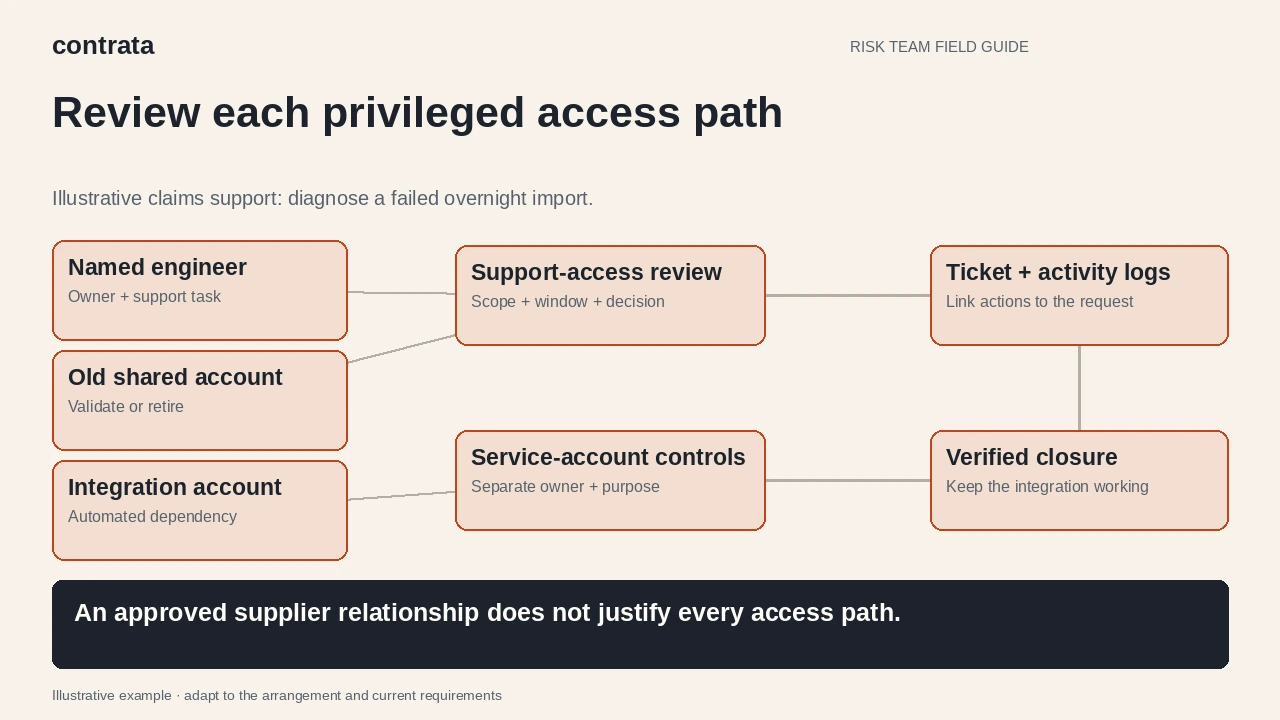
Find every access path, including the forgotten one
The insurer asks its identity administrator for a current account export and asks the supplier which identities its engineers use. The comparison finds three different paths: the named engineer’s support identity, an old shared account and an integration service account used by the overnight import.
Those findings need different decisions. The shared account raises an attribution question. The service account may be essential to routine processing. Removing all three because they carry the supplier’s name could create another outage.
Build a small reconciliation record with:
- The account identifier, account type and supplier organisation that uses it.
- The person or technical owner responsible for it and its business purpose.
- The systems, environments and effective permissions it can reach.
- The last observed use, current approval and planned end or review point.
- The evidence source and any unexplained difference between the supplier’s list and the system export.
Ask about subcontractor engineers as well. A supplier contact list can omit the people who actually provide after-hours support. If the support chain has changed, connect this review to the wider subcontractor-change assessment.

Check the session controls with the technical owner
For the named engineer, agree a support window and a separate attributable administrative identity. Ask the technical owner to demonstrate how approval enables the required permissions and how those permissions expire or are removed. A calendar reminder alone does not demonstrate removal.
Check authentication and the permitted connection route. Which managed device, remote-access service or administrative environment can the engineer use? Can the account bypass that route? A statement that “MFA is enabled” needs a defined account and access path before it answers the question.
ASD’s secure-administration guidance addresses separate administrative accounts, authentication, logging and service-account controls. It also cautions that cloud administration may require controls to be assessed and adjusted. Ask for the configuration relevant to this service rather than assuming a corporate-network design applies unchanged to a supplier’s cloud platform.
Where the supplier operates the platform and your team cannot inspect account settings directly, request a scoped demonstration or appropriate independent evidence. Record what the evidence covers and what remains unverified. The supplier-assurance report review guide can help identify whether a report actually covers the support-access controls being relied on.
Keep automation and emergency access separate
The overnight integration uses a service account, so a human support-session expiry rule would be inappropriate. Ask which job uses it, who owns the credential lifecycle and whether its permissions extend beyond that job. Have the technical team check whether interactive sign-in is needed and whether the supplier’s support staff can use the identity themselves.
Do not request passwords, keys or tokens in the review record. Evidence can identify the credential owner and show relevant settings without disclosing the secret. Any credential change needs a controlled implementation and a check that the integration still works.
Emergency or “break-glass” access needs another path. Ask how an authorised responder obtains it if normal sign-in is unavailable, who is alerted and how use is reviewed afterwards. An account that expires during the very outage it is intended to resolve may defeat its purpose. Test the emergency process through an agreed exercise, including restoration of normal controls, rather than improvising during live support.
Match what happened to what was approved
When the fictional engineer finishes, the technical reviewer compares the support ticket with available sign-in and administrative activity records. The question is whether the recorded actions fit the approved diagnostic task and whether any unexpected changes need investigation.
ISACA’s practitioner article on interactive privileged-access review connects legitimate business need, approval and review of actual activity. It is professional commentary published in 2018, not an Australian regulatory requirement. Its useful distinction is between checking who holds access and checking how that access was used.
A successful sign-in log may not show which application records changed. Record that limitation and ask the technical owner what additional evidence is available. Keep sensitive log extracts in an appropriately restricted location; the risk record can reference them without duplicating customer information.

Close the access decision, then set the next trigger
For the insurer, closure means confirming that the engineer’s support permissions have ended, investigating and resolving the old shared account, and preserving the separately approved integration identity. Record the evidence for each outcome. A ticket marked “resolved” only establishes that someone closed the ticket.
Choose the next review trigger according to exposure: a supplier engineer leaving, a changed support arrangement, unexpected activity or a change in permissions may justify an earlier check than the planned review date. Keep any unresolved limitation with its owner, decision and follow-up date.
CPS 234 requires controls proportionate to information-security risks and evaluation of relevant third-party control design. It also requires systematic control testing and assessment of relevant third-party testing where the entity relies on it. This access review is one input to that work; it does not establish compliance on its own, and the regulated entity retains responsibility.
Start with one supplier that can change an important system. Follow one support identity from approval through activity to removal, and identify every other account that could still provide access after the ticket closes.